Lilly Tracker is a privacy-first menstrual cycle and ovulation tracking app for Android with 10 million+ downloads, a 4.8-star rating from 178,000+ reviews, and a built-in community of women supporting each other. Developed by SMSROBOT LTD (Dublin, Ireland), Lilly combines accurate period prediction, ovulation and fertile window calculation, basal body temperature (BBT) logging, 30+ symptom and 40+ mood trackers, birth control reminders for pill/patch/ring, PIN-protected data privacy, free encrypted cloud backup, PDF export for healthcare providers, and the Girl Talk forum.
Unlike apps that monetize health data, Lilly Tracker never sells or shares your cycle information. Your period dates, symptoms, temperatures, and personal notes stay private — protected by a PIN code lock and encrypted during cloud backup. The app works fully offline for all core features.
Download Lilly Tracker Free on Google Play
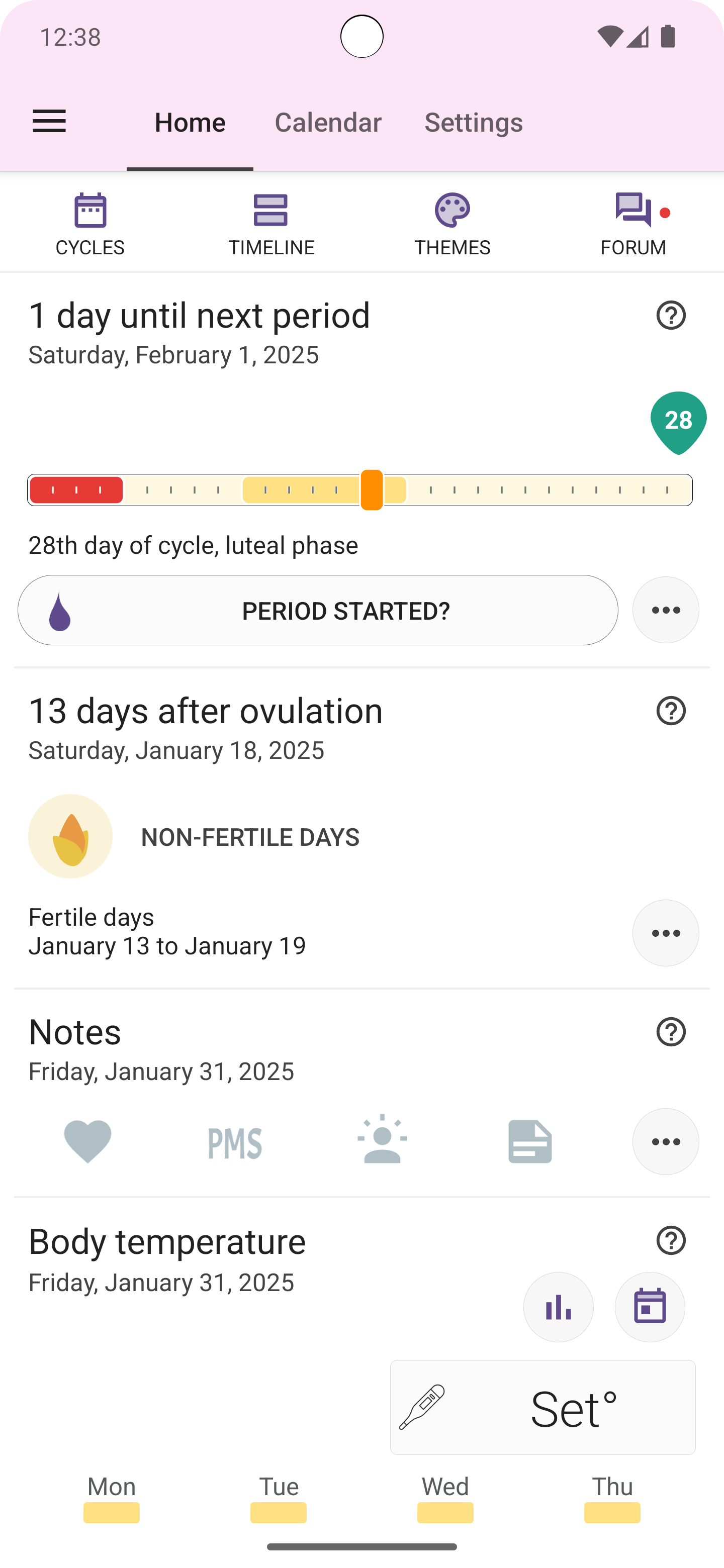
Lilly Tracker is designed for women who want accurate cycle predictions and complete data privacy. The app offers PIN-code calendar locking, encrypted cloud backup, PDF export for medical consultations, and the Girl Talk community — a forum with thousands of active members discussing periods, PCOS, fertility, and women's health. The app's card-based home screen lets users configure exactly what they see: period status, ovulation countdown, symptom quick-log, BBT graph, and birth control tracker, all in a customizable vertical scrollable layout.
| Feature | What It Does | Key Benefit |
|---|---|---|
| Period Tracking | Log period start with one tap; app calculates next period, shows days until/overdue, and sends reminders. Edit or delete cycles in Cycle Data. | Never be surprised by your period again |
| Ovulation & Fertile Window | Predicts ovulation day (cycle length minus luteal phase). Shows 5-day pre-ovulation + 1-day post-ovulation fertile window with percentage. Manual ovulation override available. | Understand your fertile days for planning or prevention |
| Basal Body Temperature (BBT) | Log daily temperature with line chart + bar chart. Mini 5-day trend on the card. Full month calendar view. Range: 33–42°C (91–106°F), auto-detected. | Pinpoint ovulation day with temperature shift |
| Symptoms Tracking | 30+ symptoms (cramps, bloating, acne, nausea, tender breasts, spotting, etc.) and 40+ moods (happy, anxious, irritable, tired, etc.) with toggle buttons. Flow intensity: light, medium, heavy. | Identify your unique PMS and cycle patterns |
| Intercourse Logging | Quick-log protected or unprotected intercourse from the Symptoms card. Visible on calendar. | Track for conception or prevention awareness |
| Birth Control Tracking | Supports pill (21/7 customizable, 20–84 active days), patch (21/7 fixed), and ring (21/7 or 28/7). Configurable reminder time, snooze interval (5–120 min), custom title/subtitle, and icon. Placebo pill support. | Never miss a pill, patch change, or ring replacement |
| PIN Privacy Lock | 4-digit PIN code locks the entire app on background. No limit on attempts. No recovery option — reinstall if forgotten (data safe with cloud backup). | Complete privacy from anyone who picks up your phone |
| Free Cloud Backup | Encrypted backup to cloud servers. Sync across devices with same email. Manual sync button. Data includes all cycles, symptoms, temperatures, moods, notes, and pill data. | Never lose your cycle history, even if you change phones |
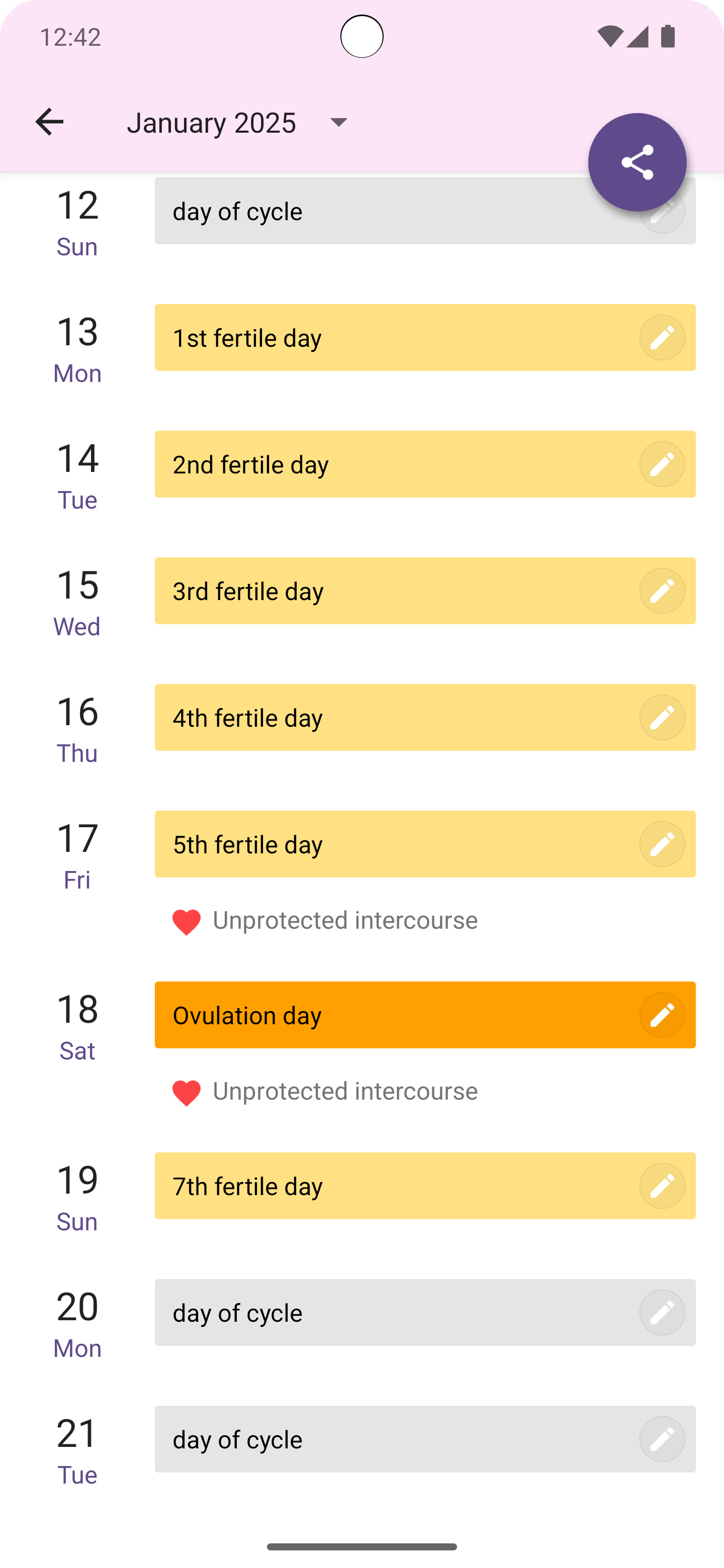
| PDF Export | Export full cycle history as a PDF from Cycle Stream view. Share via email or any app. | Share detailed cycle data with your gynecologist |
| Girl Talk Community | Built-in forum with categories: Lounge, Love, Health, Beauty, Fitness. Create posts with text and up to 5 images. Reply, like, report. Badge notifications for replies. | Connect with thousands of women on period, fertility, and health topics |
| Home Screen Widget | Shows days until next period, current cycle day, and period status. Updates once daily. | Quick glance without opening the app |
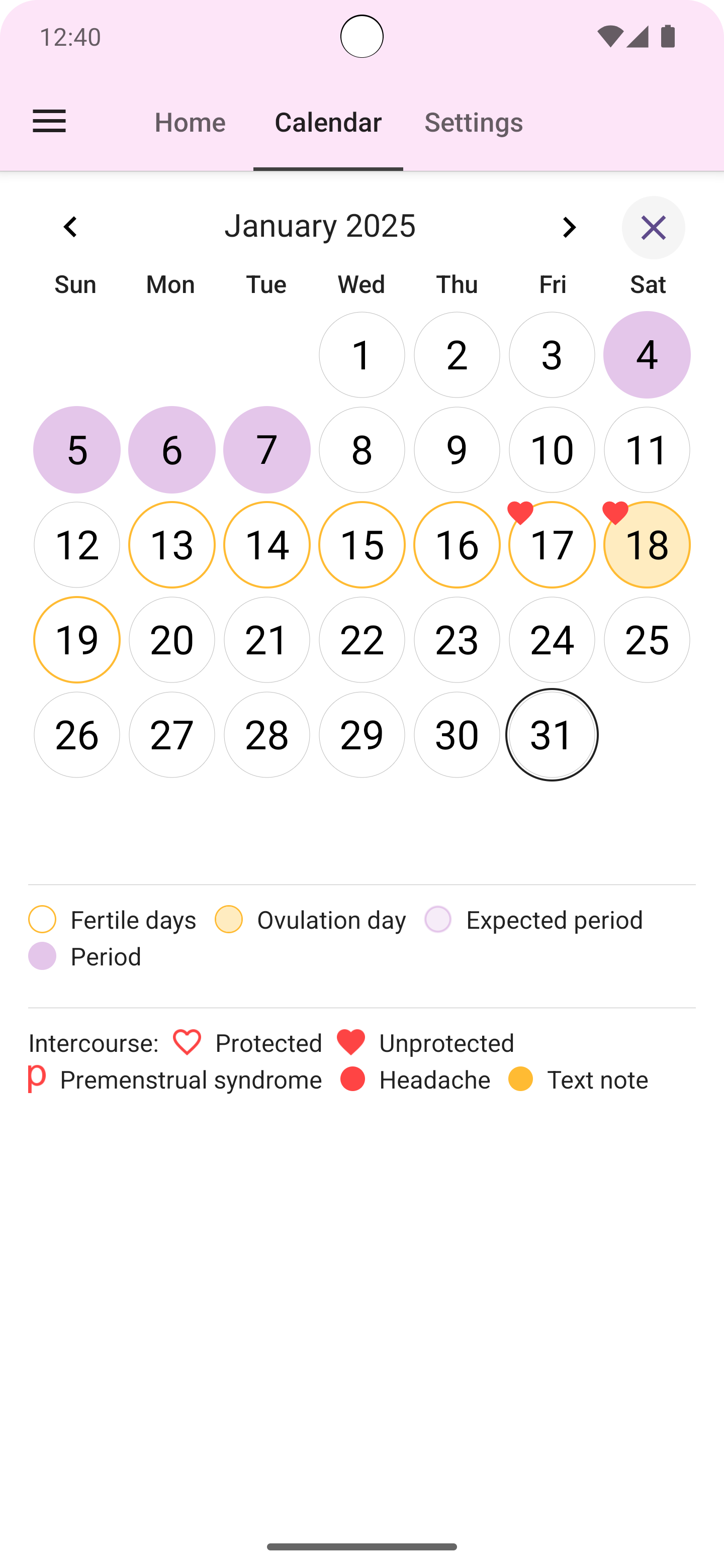
| Yearly Calendar View | Full year as 12 monthly grids. Period days highlighted, ovulation marked, fertile window shaded. Tap any date to edit cycle data. | See your entire menstrual year at a glance |
| Customizable Notifications | Period, period-late, fertility, ovulation, and birth control alerts. Configurable days-before, repeat time, custom notification text (for privacy). Bell icon toggle per card. | Get the reminders you need, with discreet labels |
| 9 Color Themes | Themes include Bird (pink), Red, Teal, Blue, Indigo, Black (dark mode), Orange, Yellow. Apply instantly. | Personalize the app to your style, including dark mode |
| Multi-Language Support | Supports 20+ languages including English, Arabic, Bengali, Chinese, Dutch, French, German, Indonesian, Italian, Japanese, Korean, Malay, Polish, Portuguese, Russian, Serbian, Spanish, Swedish, Thai, Turkish, Vietnamese, and more (follows device language). | Use the app in your preferred language |
The Home tab is a vertical scrollable list of configurable cards, each dedicated to a specific tracking feature:
| Card | What It Shows | Default |
|---|---|---|
| Period Card | Cycle phase, days until/overdue, cycle graph bar | Active |
| Ovulation Card | Days until/after ovulation, fertile window, fertility percentage | Active |
| Symptoms Card | Quick-log for intercourse, PMS, headache, notes | Active |
| Temperature Card | Daily BBT with 5-day mini line chart | Active |
| Birth Control Card | Pill/patch/ring tracking with reminders | Disabled by default |
Cards are toggled on or off and reordered by dragging from the "More…" link at the bottom of the Home tab. Each card has a help button in its top-right corner that explains what the card does. A hamburger menu drawer on the Home tab provides access to backup, settings, rate, and contact options.
Lilly Tracker is built on a privacy-first architecture. The app uses PIN-code calendar locking so your cycle information stays hidden from anyone who picks up your phone. All data transmitted between the app and cloud backup servers is encrypted in transit. You can request deletion of your personal data at any time by emailing support@smsrobot.com. The app does not collect or share your health data with third parties — anonymous usage statistics and crash reports are sent without period dates, temperatures, symptoms, or personal notes. Lilly Tracker is developed by SMSROBOT LTD, an Irish-registered company (registration 522641) headquartered at The Black Church, St. Mary's Place, Dublin 7, Ireland, and is subject to EU privacy regulations. See our full privacy policy for details on data collection, encryption, and your rights.
Lilly calculates your next period date based on your logged cycle history. By default, the app uses the cycle length you set during initial setup (e.g., 28 days). When "Use Average Values" is enabled in Settings, the app automatically analyzes all your completed cycles to calculate your personal average cycle length, period length, and luteal phase length. These averages update after each completed cycle, making predictions increasingly accurate over time. For users with irregular cycles (PCOS, perimenopause, etc.), the app adapts to actual logged data — the more cycles recorded, the better the prediction. See the complete period tracking guide for more details.
Ovulation is calculated as: Ovulation day = Cycle length - Luteal phase length. For a 28-day cycle with a 14-day luteal phase, ovulation is predicted on day 14. The fertile window spans 5 days before ovulation plus 1 day after ovulation (total 6 days). The app displays a fertility percentage that increases from 10% on the first fertile day to 100% on ovulation day. Users can manually override the predicted ovulation date from the Ovulation Card settings, or reset to automatic calculation at any time. Learn more in the ovulation tracking guide.
Lilly supports three contraceptive methods: pill, patch, and ring. Each method has its own reminder time, snooze interval (5–120 minutes), custom title and subtitle, icon selection from 16 choices, and ringtone picker.
| Method | Default Active | Default Break | Configuration |
|---|---|---|---|
| Pill | 21 days | 7 days | 20–84 active, 0–8 break, placebo option |
| Patch | 21 days | 7 days | Fixed (21 active, 7 break) |
| Ring | 21 days | 7 days | 21 or 28 active, 0 or 7 break |
The Birth Control card shows current day number in the cycle, pills left in pack (for pills), patch number (for patches), replacement countdown, and a bell icon toggle for notifications. When a reminder fires, tapping "Snooze" dismisses it temporarily and it reappears after the repeat interval. Tapping "Pill taken" or "Done" logs the confirmation and stops reminders for the day. The app cycles continuously — after the last active day plus break days, it automatically starts a new cycle from day 1.
Lilly Tracker has maintained a 4.8 out of 5 stars across 178,000+ reviews on Google Play. Users consistently praise the app's simplicity, accuracy, and privacy features. Long-term users report using Lilly for 7+ years continuously, relying on it through pregnancy attempts, PCOS management, and everyday cycle tracking. The app has been published on Google Play since January 2015 and receives regular updates — the most recent update was August 7, 2025.
The Settings tab is divided into three sections: Period & Ovulation, Notifications, and Period Data. In Period & Ovulation, you can set cycle length (10–55 days), period length (1–10 days), and luteal phase length (5–28 days). The "Use Average Values" toggle automatically calculates your personal averages from all logged cycles and updates predictions after each completed cycle.
Period Data settings include cloud backup management, PIN protection with a 4-digit code, first day of week for the calendar (locale default, Saturday, Sunday, or Monday), and options to delete local data or the backup account.
Six notification types are available: Period, Period Late, Fertility, Ovulation, Birth Control, and Backup. Each can be enabled or disabled with configurable days-before, repeat time, and custom notification text — for example, "Appointment" instead of "Period due" for privacy. The bell icon on each card provides instant mute or unmute without opening settings. On Android 13+, the app must request notification permission. For reliable delivery on Samsung, Huawei, and Xiaomi devices, add Lilly Tracker to your system's "protected apps" or "auto-start" list.
Lilly Tracker was created by SMSROBOT LTD, a mobile development company based in Dublin, Ireland. The company is a Google Play Top Developer with 12 apps published on Google Play and 40 million+ active downloads. The team includes: Zoran Gasić (Chief of Unicorn Division), Slobodan Ivković (The Wrench Monkey), and Dušan Živković (Head of R&D Android Excellence). The company's mission is to create high-quality, user-friendly mobile applications with a focus on privacy and usability.
Yes — Lilly Tracker is completely free to download and use. The app contains ads to support development. A one-time in-app purchase permanently removes all ads.
Yes. Your data is stored securely on your device with optional PIN protection. Cloud backups are encrypted in transit and on the server. The app does not sell or share your cycle data. Anonymous crash reports contain no personal health information.
Lilly's predictions should not be used as a form of birth control or contraception. The app is a tracking and prediction tool, not a medical device.
Yes. Lilly adapts to your actual logged cycles. Enable "Use Average Values" so the app learns from your data over time. Users with PCOS and other conditions that cause irregular cycles have reported positive experiences.
Yes — enable Cloud Backup on both devices using the same email and password. Tap "Synchronize Now" to force an immediate sync. Your full history restores on the new device.
Open Cycle Stream (timeline icon on the Home tab), tap the share/export button, select PDF. The app generates a formatted PDF of all cycle data that you can email or share.
Yes. Period tracking, temperature logging, symptoms, and all local features work fully offline. Internet is only required for cloud backup, the community forum, ads, and in-app purchases.
Android 6.0 (API 23) or higher. The app is fully compatible with Android 15 (API 35) and handles all modern permission requirements including notification permissions (Android 13+) and exact alarm scheduling (Android 14+).
Join 10 million+ women who trust Lilly Tracker for accurate period tracking, ovulation prediction, BBT logging, symptom and mood tracking, and private cycle management. Available now on Google Play for all Android devices running Android 6.0 and above.
Download Lilly Tracker Free on Google PlayAndroid is a trademark of Google LLC. Lilly Tracker is developed by SMSROBOT LTD, The Black Church, St. Mary's Place, Dublin 7, Ireland. For support, email contact@smsrobot.com.
Published by SMSROBOT LTD | Last updated: August 15, 2026